
Running a Function When an #await Block resolves in Svelte(Kit)
The #await block in svelte is very handy for handling asynchronous data. But let's say I want a certain function to run when the promise has been resolved or rejected (like a toast).
About the #await block in svelte
The #await block in svelte is very handy for handling asynchronous data:
<script>
  import Loader from "$components/forms/Helpers/Loader.svelte";
  export let data; // let's say data.myPromise is a promise.
</script>

{#await data.myPromise}
  <!-- This is what shows while the promise is pending -->
  <Loader />
{:then results}
  <!-- Shows this if/when the promise resolves successfully -->
  {#each results as result}
    <li>{result}</li>
  {/each}
{:catch error}
  <!-- Shows this if/when the promise rejects -->
  <p class="text-red">{error?.message ?? "Something went wrong"}</p>
{/await}
This is basically how the #await block works in svelte. It displays different content based on the state of a promise: a loading indicator while pending, results when resolved, and an error message if rejected.
But let's say I want a certain function to run when the promise has been resolved or rejected (like a toast).
Run (trigger) a function when the #await block resolves or rejects
Here's how you can run specific functions when the promise resolves or rejects:
<script>
  import { toast } from "svelte-sonner";

  /**
   * Displays a success toast
   * @param {number | string} resultsLength - Number of results
   */
  function showSuccess (resultsLength) {
    toast.success(`${resultsLength} result${resultsLength > 1 ? "s" : ""} retrieved!`)
  }

  /**
   * Displays an error toast
   * @param {string} [errorMessage] - Error message to display
   */
  function showError(errorMessage) {
    toast.error(`An Error Occured`, { message: errorMessage ?? "Unknown Error" })
  }
</script>

{#await data.myPromise}
  <!-- Displays while the promise is pending -->
  <Loader />
{:then results}
  <!-- Run showSuccess when the promise resolves -->
  {showSuccess(results.length)}
  <!-- Display results -->
  {#each results as result}
    <li>{result}</li>
  {/each}
{:catch error}
  <!-- Run (trigger) showError when the promise rejects -->
  {showError(error.message)}
  <!-- Display error message -->
  <p class="text-red">{error?.message ?? "Something went wrong"}</p>
{/await}
Now, our function will run whenever the code block is reached.
showSuccessis called when the promise resolves, with the number of results as an argument.showErroris triggered if the promise rejects, displaying a custom error message.
Fix undefined or any returned text showing up in browser
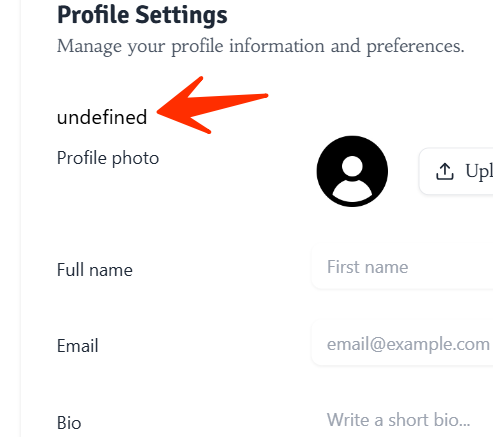
When these functions run, whatever is returned text will show up in the browser, because it's kind of a workaround. The syntax we used is usually to meant to show returned strings/numbers in the browser. Even returning nothing will return the default undefined. And this string (which usually make no sense), will be displayed to the end user.
So, make sure to return empty strings, or wrap the function in an hidden block:
1. Method 1 (Return empty strings):
<script>
  function showSuccess (resultsLength) {
    toast.success(`${resultsLength} result${resultsLength > 1 ? "s" : ""} retrieved!`)
    return ""; // Return an empty string
  }
</script>

{#await data.myPromise}
  ...
{:then results}
  {showSuccess(results.length)} <!-- Won't render any text in the UI -->
  ...
{/await}
2. Method 2 (Hide the returned text from the function in the UI with CSS.)
<script>
  function showSuccess (resultsLength) {
    toast.success(`${resultsLength} result${resultsLength > 1 ? "s" : ""} retrieved!`)
  }
</script>

{#await data.myPromise}
  ...
{:then results}
  <div class="hidden">
    {showSuccess(results.length)}
  </div>
  ...
{/await}

<style>
  .hidden { display: none; }
</style>
Happy Hacking!